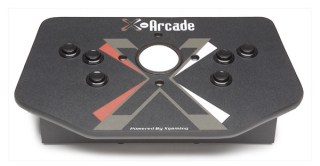
X-Arcade doesn’f fool around. Their recently released X-Arcade Trackball is proof of this. It looks like they ransacked an arcade cabinet, carefully cut out the controller portion, tossed away the rest and then put this bad boy on sale. It’s crystal clear that they take their products seriously – they’re built to last, made with top quality parts and can be used as part of a PC/console gaming rig or perhaps more industrious pursuits such as recreating an authentic arcade experience via MAME.
Features:
- Fully Compatible With Emulation Software To Play Thousands Of Arcade Classics
- Withstand Thousands Of Hours Of Button Smashing Action
- Use With Any PC Or Mac™ Through USB or P/S2 Port
- Use With Any Game That Supports A Mouse
- 100% Compatible With All Arcade Emulators (MAME™ And Gametap™)
- Inject Arcade Control On Games Like Marble Madness™, Simpson’s Bowling™, Golden Tee Golf™ & Tiger Woods PGA Tour™
- 100% Fully Serviced Lifetime Warranty
- Use In Conjunction With X-Arcade Joystick Or As Stand-alone
A trackball for those unsure, is used to control games that require quick circular, up and down and/or side to side movement. If you’ve ever played Centipede or Millipede in an arcade, you’ll have used the trackball. It is used by rolling your hand over the ball in any direction you choose – it works identical to the ball in your mouse (if you are still using a mouse with a ball). In fact, the X-Arcade Trackball instantly becomes a 3 button mouse when you hook it up to your PC via USB (PS/2 adapter is also available for those without USB).
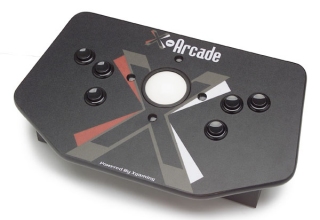 While the Trackball controller is built like a Sherman tank, it’s as sleek and sexy in its design as its counterpart, the X-Arcade Stick, both of which are mandatory in any gaming enthusiasts arsenal. While not quite as big as the two player X-Arcade Stick, the Trackball manages to feature an 8 button layout – 3 buttons on each face side which allows for left or right handed players, 1 Left button and 1 Right button on the sides of the controller (which could be used as pinball flippers) and even a special button on the back of the controller which eliminates left and right movement if so desired.
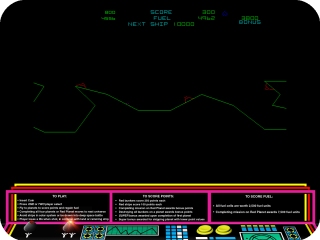
The Trackball ships with the Atari Anniversary collections Vol. 1 & 2 which features Asteroids, Deluxe Asteroids, Pong, Missile Command, Centipede, Millipede, Crystal Castles, Tempest, Super Breakout, Warlords, Gravitar and Battlezone. While you won’t be able to use the trackball in all of the games, the ones that are compatible play wonderfully with the unit, even if they didn’t use a trackball in the original such as Asteroids, Tempest, Pong & Super Breakout. This software anthology is a great showcase for the Trackball and will delight those gamers old enough to remember how they were played way back when.
 Setting up the unit simply requires either a free USB port or you will have to disconnect your PS/2 mouse connector and plug it into the mouse port on the back of your PC. As mentioned the trackball functions as a 3 button mouse so you won’t have any problems navigating your Windows or Mac operating system. You won’t be tossing your mouse in the trash in favor of using the trackball permanently, but it will definitely get you around your system if you have to disable your mouse.
Unfortunately my Trackball unit didn’t work 100% when I received it as it wouldn’t allow left and right movement. Due to shipping more than likely, I could hear something rattling around inside the unit and so I had to crack it open to have a look. Taking the unit apart was easy (as long as you have the right tools – Phillips screwdriver, socket set, butter knife) and didn’t take long to get apart. The entire process from start to finish was probably 20 minutes (that included finding my tools). One of the wheels that registers movement on the left and right axis had come off requiring me to open up the trackball housing unit and rethreading the screw and the wheel back in place. Once that was done and the unit put back together, the controller worked 100%. It was actually fun to peek inside and have a look at what was going on in there. Even on the inside of the controller, you can see the quality at work.
I 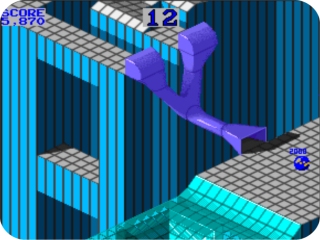 ‘ve been dabbling in MAME for the last couple of years and instantly fired up some good old arcade classics that have been dying for a trackball – such as Marble Madness and the original arcade versions of some of the games that were present on the Atari anthology. I found that my version of MAME required no setup at all and the trackball worked without a hitch allowing me to enjoy these games the way they were meant to be played. My wife even got in on the action as she loves Centipede.
The trackball can be set for your desired sensitivity depending on what kind of software you’re playing. If you’re using Windows based gaming, simply open up Windows Control Panel and change the speed of the mouse which will affect the trackball; if you’re using emulated arcade software via MAME, you might need to open the configuration menu and change the percentage of sensitivity on the X and Y axis (this will have to be done for each game in MAME). I personally didn’t need to change any settings at all and I have to say it was great playing those games the way the video game Gods intended.
The unit retails for $99 which possibly puts it out of the price range of casual users. However arcade gaming enthusiasts will no doubt find this price point an incredible steal, considering the quality of the item, the lifetime warranty and the “where else am I going to find a trackball?” factor. It’s definitely more of a niche item than the X-Arcade Stick but if you’re serious about authentic gaming experiences, the X-Arcade Trackball is a must have.